

Dhamnekar Win,odd
Senior Members
-
Joined
-
Last visited
-
Currently
Viewing Topic: Some basic assumptions of human body and celestial nine planets
Everything posted by Dhamnekar Win,odd
-
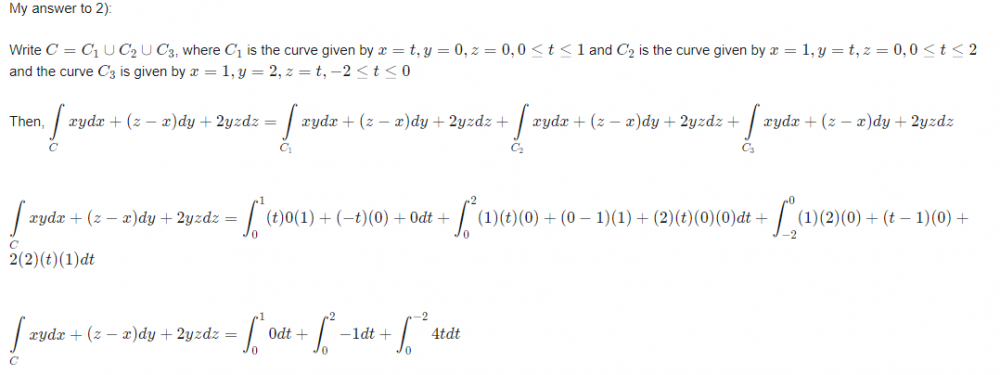
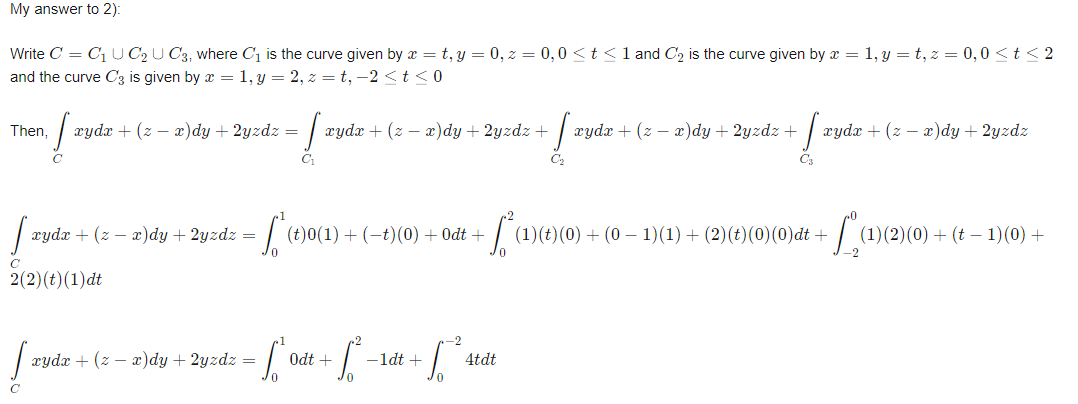
[math]\displaystyle\int\limits_C xydx + (z-x)dy + 2yzdz = 0-2+8=6[/math]
-
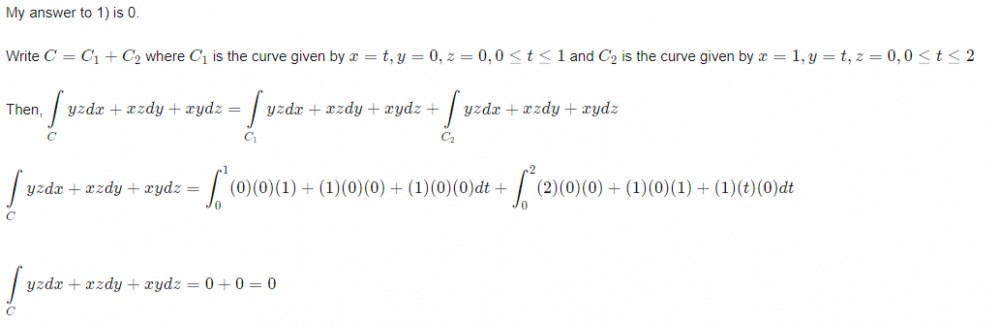
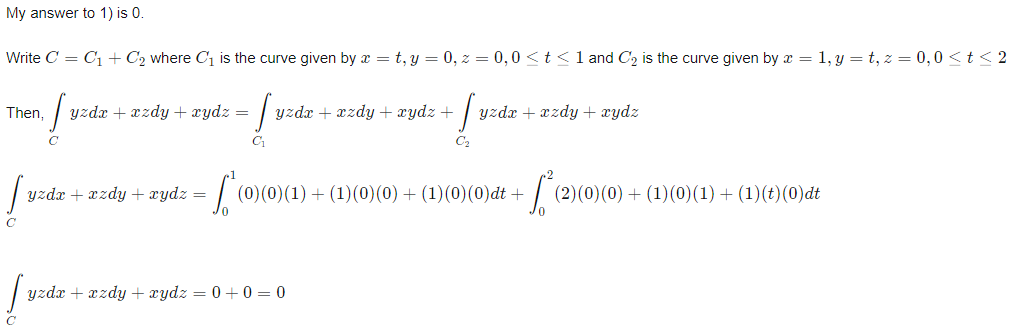
Calculate the line integral of the vecor field f(x,y,z) along the curve C [math]\left(\displaystyle\int\limits_C f \cdot dr\right) [/math] 1)f(x,y,z) = yzi + xzj + xyk; C : the polygonal path from (0,0,0) to (1,0,0) to ( 1,2,0). 2)f(x,y,z) = xyi + (z-x)j + 2yzk; C : the polygonal path from (0,0,0) to (1,0,0) to (1,2,0) to (1,2,-2). How can I use here Stokes theorem? My work to answer to both these questions is in progress. Any math help, clue, or even correct answers will be accepted.😇😀
-
A circular target of unit radius is divided into four annular zones with outer radii 1/4, 1 /2, 3/4, and I, respectively. Suppose 10 shots are fired independently and at random into the target. (a) Compute the probability that at most three shots land in the zone bounded by the circles of radius 1 /2 and radius 1. (b) If 5 shots land inside the disk of radius 1 /2, find the probability that at least one is in the disk of radius 1 /4. My answers:(a) [math] \displaystyle\sum_{k=0}^{3}\binom{10}{k}(\frac34)^k (\frac14)^{10-k}[/math] (b)[math] \frac{\displaystyle\sum_{k=1}^{5}\binom{5}{k}(\frac{1}{16})^k(\frac{3}{16})^{5-k}}{\binom{10}{5}(\frac14)^5(\frac34)^5}=1.275e-2[/math] My answer to (a) is correct. Author's answer for (b) is [math] 1- (\frac34)^5[/math] Whose answer is correct? My answer for (b) or author's answer for (b)?
-
It is sometimes necessary to compute E° for a given half reaction from other half reaction of known E°. For example, the standard electrode potential for the oxidation of Titanium metal to Ti³⁺ can be obtained from the following half reaction: Ti²⁺ + 2 e⁻ ⇌ Ti⁰ E° = -1.63 Volts ① Ti³⁺ + e⁻ ⇌ Ti²⁺ E° = -0.37 Volts ② Calculate E° for Ti⁰ ⇌ Ti³⁺ + 3 e⁻ My answer: ② is more spontaneous reaction than ①. Reduction: Ti³⁺ + e⁻ ⇌ Ti²⁺ E° = -0.37 Volts ; Oxidation: Ti²⁺ + 2 e⁻ ⇌ Ti⁰ E° = -1.63 Volts Hence, E∘rx=E∘red−E∘ox=−0.37V−(−1.63V)=+1.26VErx∘=Ered∘−Eox∘=−0.37V−(−1.63V)=+1.26V My answer matches with author's answer. But, Is my logic in answering this question correct?
-
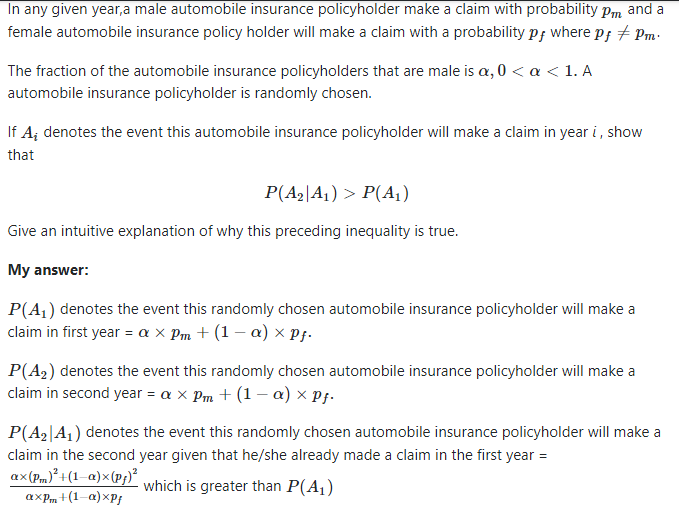
Is the above intuitive explanation of "why the inequality [math] P(A_2|A_1) > P(A_1)[/math] is true" correct?
-
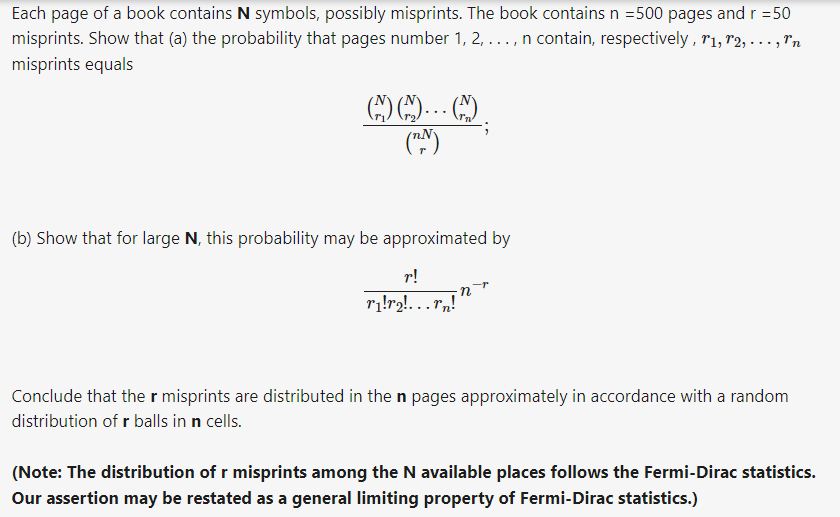
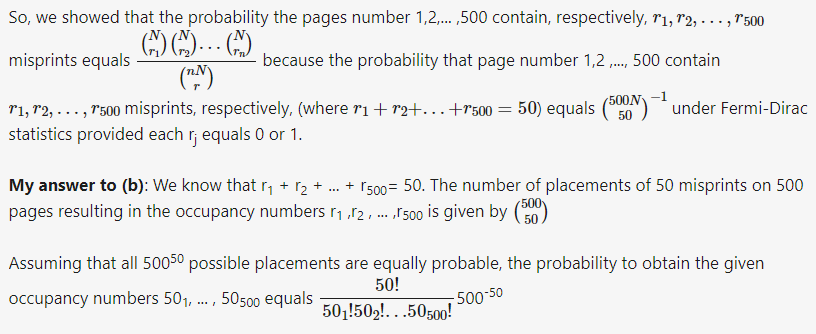
My answer to (a) N= Total symbols on each page. r= 50 misprints. So, what is impossible is two or more misprints occurring in the same symbol. So, first condition of Fermi-Dirac statistics is satisfied. All distinguishable arrangements satisfying the first condition have equal probabilities. In our case, It is [math]\binom{500N}{50}^{-1}[/math]
-
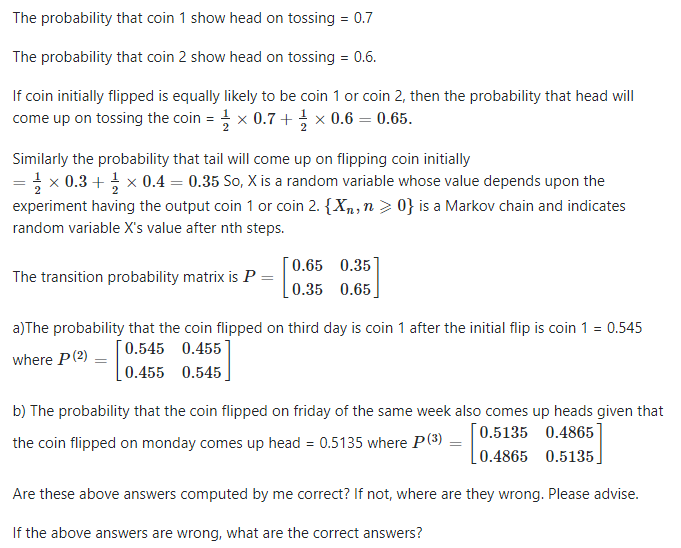
Suppose that coin 1 has probability 0.7 of coming up heads, and coin 2 has probability 0.6 of coming up heads. If the coin flipped today comes up heads, then we select coin 1 to flip tomorrow, and if it comes up tails, then we select coin 2 to flip tomorrow. If the coin initially flipped is equally likely to be coin 1 or coin 2, then a)what is the probability that the coin flipped on the third day after the initial flip is coin 1? b)Suppose that the coin flipped on Monday comes up heads. What is the probability that the coin flipped on Friday of the same week also comes up heads? My attempt to answer this question:
-
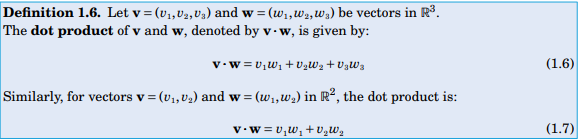
If f is in the direction of r'(t) then it is in the direction of increasing r(t). So, the directions of f(t) and r'(t) will also be same. Definition of dot product: And ds =|| r'(t)|| ⇒ [math]\sqrt{x'(t)^2 + y'(t)^2}dt [/math] so, work = force × distance = [math] \displaystyle\int_C f\cdot dr= \displaystyle\int_C \left\vert\vert{f} \right\vert\vert ds[/math]
-
. Show that if f points in the same direction as r'(t) at each point r(t) along a smooth curve C, then [math]\displaystyle\int_C f\cdot dr = \displaystyle\int_C ||f|| ds ?[/math] How can I prove this corollary in line integral?
-
I got the answer to this question. I computed it as follows: [math]\displaystyle\int_0^{2\pi} 12 dt = 24\pi[/math]
-
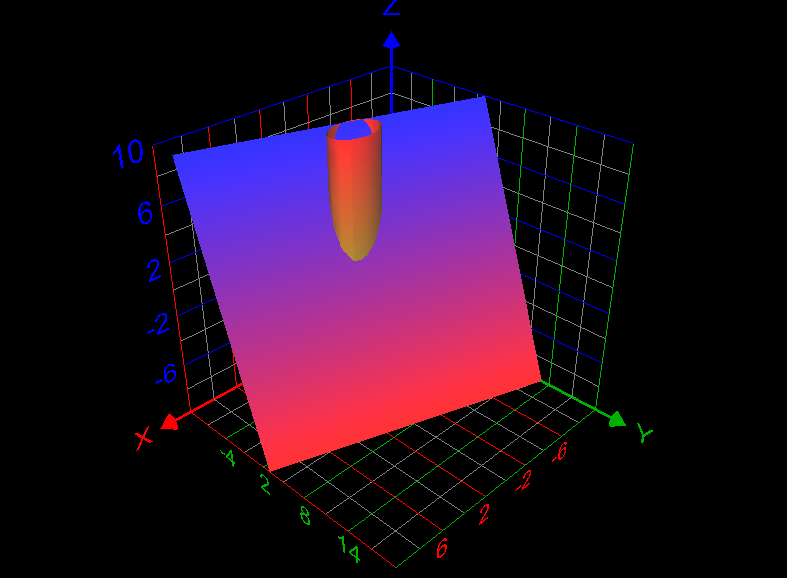
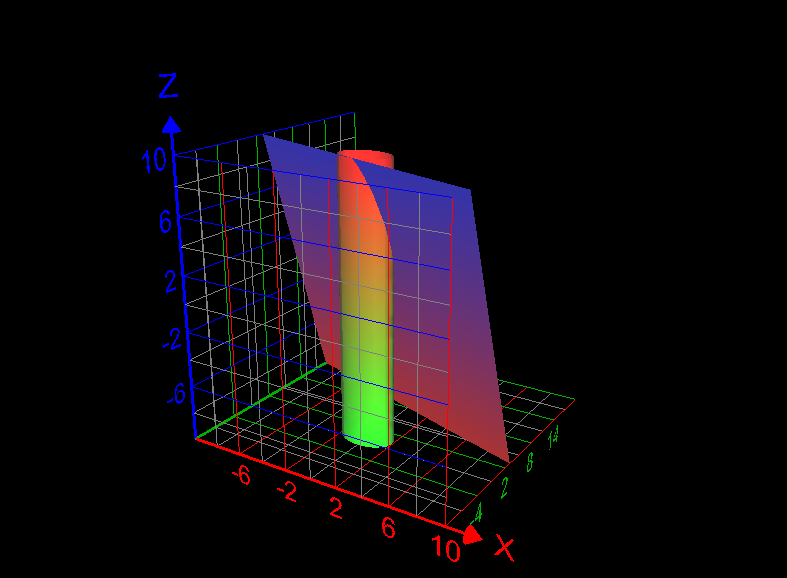
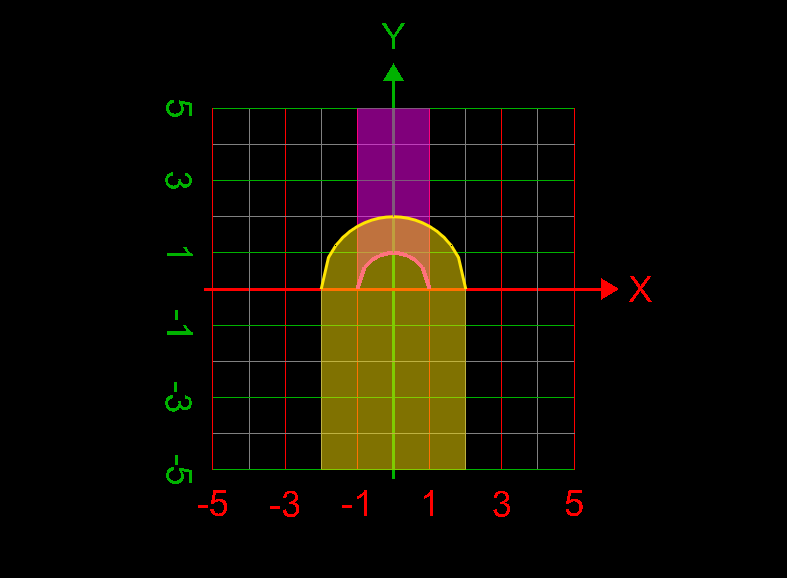
Use a line integral to find the lateral surface area of the part of the cylinder [math]x^2 +y^2 =4[/math] below the plane x + 2y + z =6 and above the xy-plane. How to answer this question? What is the answer of this question? Graph of the required lateral surface area of the cylinder is given below:
-
I tag this question as 'SOLVED'. Author's computations are correct. Thank you.
-
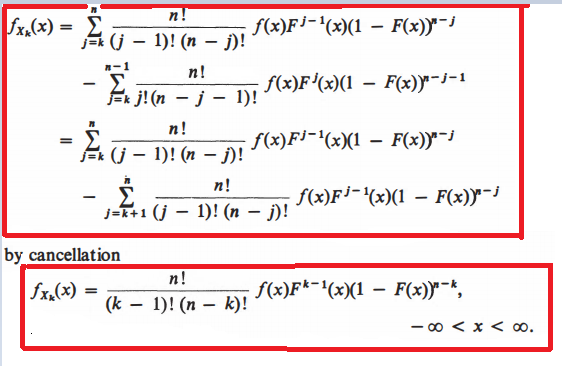
After studying these author's computations, I understood the differentiation part but I don't understand cancellation part and final term computation.
-
Author computed [math]F_{X_k} (x)[/math] as follows. but I don't understand it. Would any member explain me the following computations?

-
Answers to all of the aforesaid questions are affirmative.
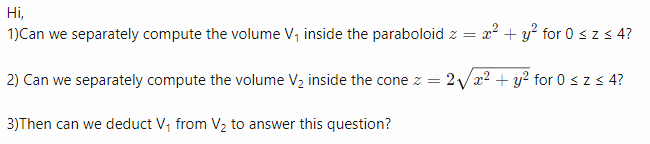
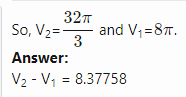 I think my answer in the original post is incorrect. So, I want to correct it. My corrected answer is [math] \displaystyle\int_0^{2\pi}\displaystyle\int_0^2\displaystyle\int_0^4 r dz dr d\theta =16\pi [/math] Is this answer correct?Find the volume of the solid bounded by [math]z = x^2 + y^2 [/math] and [math] z^2 = 4(x^2 + y^2) [/math] My attempt to answer this question: [math] \displaystyle\int_0^{2\pi}\displaystyle\int_0^2\displaystyle\int_0^4 1 \rho^2 \sin{(\phi)} d\rho d\phi d\theta = -\frac{128\pi \cos{(2)}- 128\pi}{3}= 189.822143919[/math] Is this answer correct?
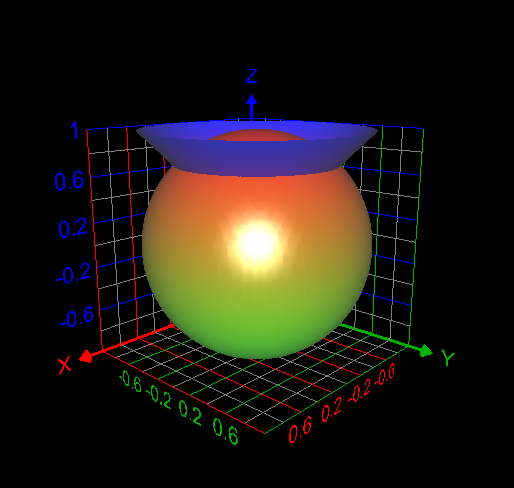
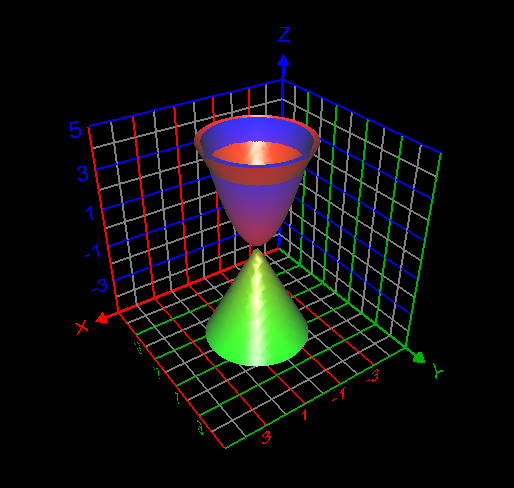 I computed the volume inside both the sphere [math] x^2 + y^2 + z^2 =1[/math] and cone [math] z= \sqrt{x^2 + y^2}[/math] as follows: [math]\displaystyle\int_0^{2\pi} \displaystyle\int_0^{\frac{\pi}{4}}\displaystyle\int_0^1 \rho^2 \sin{\phi}d\rho d\phi d\theta= 0.61343412301 =\frac{(2-\sqrt{2})\pi}{3}[/math]. This answer is correct.I want to correct the volume asked in the question computed by me = [math] \frac{\pi}{3} \times \frac12 \times \frac{1}{\sqrt{2}} + \frac{\pi}{3} \times (1-\frac{1}{\sqrt{2}})^2 \times (\frac{3}{\sqrt{2}} -(1-\frac{1}{\sqrt{2}}))=0.534497630798[/math]
 My attempt: I graphed the cone inside the sphere as in my first post. But I don't understand how to use the change of variables technique here to find the required volume. My answer without using integrals is volume of the cone + volume of the spherical cap = Is this answer correct? If correct, how to derive this answer using integration technique?
Find the volume V inside both the sphere x2 + y2 + z2 = 1 and the cone z = [math]\sqrt{x^2+ y^2}[/math] How to use change of variables technique in this problem?
My attempt: I graphed the cone inside the sphere as in my first post. But I don't understand how to use the change of variables technique here to find the required volume. My answer without using integrals is volume of the cone + volume of the spherical cap = Is this answer correct? If correct, how to derive this answer using integration technique?
Find the volume V inside both the sphere x2 + y2 + z2 = 1 and the cone z = [math]\sqrt{x^2+ y^2}[/math] How to use change of variables technique in this problem?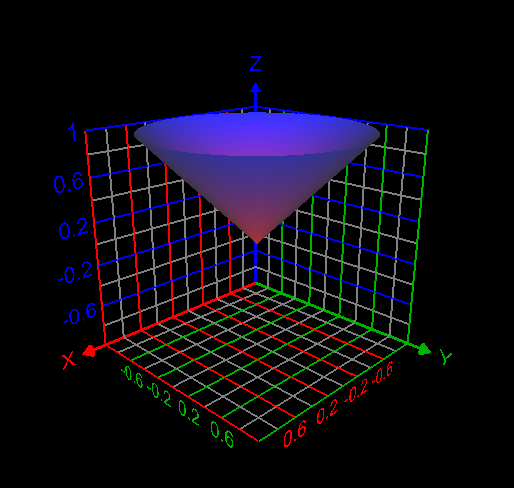
 Yes. From that point of view, this program is wrong. But we already decided to ignore the leap year and we mentioned that as the comment.I tag this question "SOLVED". I got the correct answer.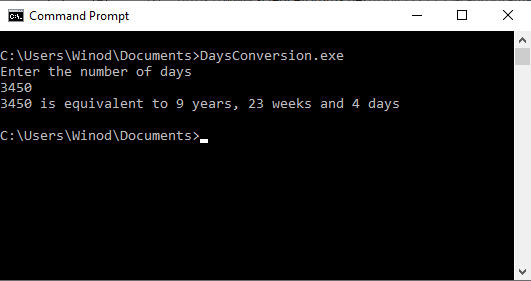


Important Information
We have placed cookies on your device to help make this website better. You can adjust your cookie settings, otherwise we'll assume you're okay to continue.