
Heretic86
Members
-
Joined
-
Last visited
Everything posted by Heretic86
-
I tweaked the Rate slider so the value default is 1, min value is 0.1 and max is 2, so it never hits 20 as the exponent. Like you said n ** 20 is rather extreme. I know how to use console.log(), console.warn() and console.error just fine as well as most of the Math static functions. Im not a total idiot, parts are missing, so only partially dumb. (Specifically, I had my Wisdom Teeth removed.... oh, wait) This was supposed be a request for "one line of code" that it seems no one has been able to help me with so far, even on other forums...
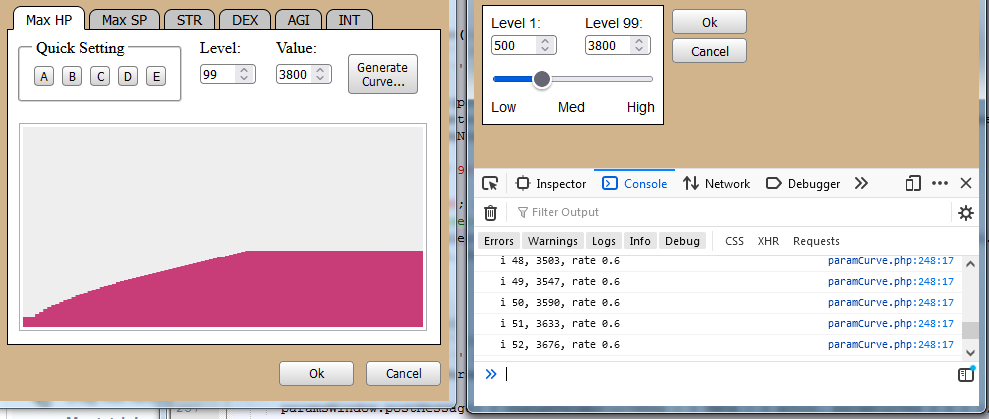
-
Well now it shoots up and hits the max at Level 20, not 99, then just stays at whatever that is, clamped. No curve...
-
I already have a Canvas Draw method: drawParam(){ this.ctx.clearRect(0, 0, this.ctx.canvas.width, this.ctx.canvas.height); this.ctx.fillStyle = this.htmlColor(); let params = this.actor.parameters[this.type]; let s = ([0,1].includes(this.type)) ? 100 : 10; let ch = 100 / this.ctx.canvas.height * 100; let cw = this.ctx.canvas.width / params.length, w = Math.ceil(cw); for (let i = 0; i < params.length; i++){ let x = i * cw; let h = parseInt((params[i]) / s / (1 / (this.ctx.canvas.height / 100))); let y = this.ctx.canvas.height - h; this.ctx.fillRect(x, y, w, h); } } Im stuck on this line, I dont see where to use Math.pow(x, y) in the call... actor.parameters[selectedParameterId][i] = Math.round(min + Math.pow(i * n, rate)); I need the LAST VALUE to end up at 5000, or whatever the user has in the "Level 99" value, not just unlimited growth into the stratosphere...
-
Hi all, not sure if this is the right place ask for help with using Javascript to calculate a curve for Exponential Growth / Decay... I have a form element that has a Min, Max, and Rate, where if the Rate slider is set to 0, its just straight Linear Growth... Im trying to mirror functionality from these Window Forms: What I'd like to do is to move the Range (where it says Fast Middle Slow) so the output looks like this: This is my function so far... function calculateValues(){ if (level1.value == '' || !level1.checkValidity()) return; if (level99.value == '' || !level99.checkValidity()) return; let rate = parseInt(paramRate.value); let min = actor.parameters[selectedParameterId][0], max = actor.parameters[selectedParameterId][98]; if (isNaN(min) || isNaN(max)) return; let n = (max - min) / 98; for (let i = 0; i < 99; i++){ actor.parameters[selectedParameterId][i] = min + Math.round(i * n); } } The function is INCOMPLETE. I need to keep the first and last values the same in the data set. What do I need to do to generate the Exp Curves as displayed in the windows I am trying to emulate?