Sayuri2009
Members
-
Joined
-
Last visited
-
To your question : How to read element of an array/list? I have to iterate through the array list. That means I need a for or while loop. whether integer is positive or negative! if(number > 0 ) this for positiv if(number < 0) this for negativ
-
In java should be programmed So I have to init the value of the array everytime? And if I do not know the size of the array? if the array have different length then I can't compare the array. I have to use one for loop so it means array [] a1 = new int[4]; array[] a2 = new int[4]; for(int i = 0 ; i < a1.length; i ++){ if a1 = a2{ } } return count Shouldn't you be comparing SIGNS of integers? Yes, I should do that. How to check the sign of a single integer? I have to check it with xor and then I have to shift to left to get the MSB if its 0 then its positive otherwise negative How to compare if the signs of two integers are equal? counter stays the same I don't have to increment How to treat zero element? As positive sign? if its zero element then I don't have to compare and return null?
-
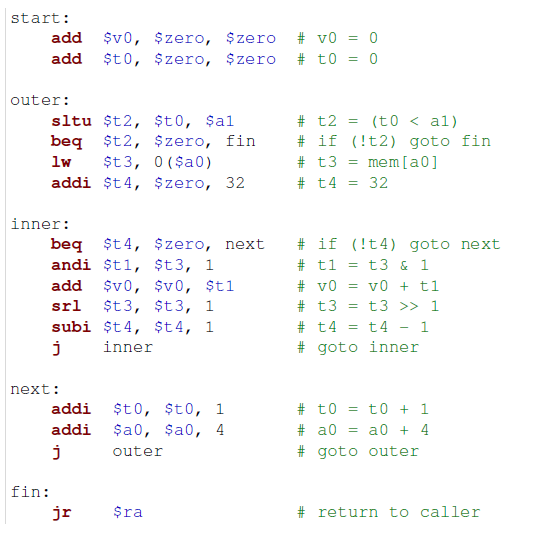
0($a0) it will put the value from a0 at 0 (brackets indicates memory address) into a particular register. I will exit the outer loop when t2 is equal to 0 then I will leave the outer loop and go to the fin label.
-
Thanks for your reply. What I see is there is one return value v0 because its always the case in MIPS (I think) and what I also know from MIPS is that a0, a1 are parameters. What I also know from this code is there are two loops one is the inner and the other is the outer loop. t4 = 32 is set and starts in inner loop subi decrements the counter if its 0 then it will jump to the next label. Here is my understanding from the code in green but I am not sure if I understand it correctly. why is there andi? its a mask? srl means I am doing a multiplication by 2. start: here v0 = 0 and t0 = 0 is the initialization. two loops: outer and inner outer t3 = I am loading the value from a0 into t3. t4 is set to 32 inner if(t4 == 0 ) go to next else do mask with and sum up v0 with t3 in v0 multiply t3 by 2 decrement the counter t4 by 1 jump to the label inner and do it until the condition beq is true, that means if t4 == 0 then jump to next label next t0 = 1 a0 = 4 jump to outer loop
-
Thanks for your reply and thanks for the hint with the assembly editor. What I understand so far is the following comments that I made. But from this I don't get it how to interpret.
-
Hi, In general I am very new in programming. Write a program that compares the sign of pairs of 32-bit numbers from two arrays of numbers and counts how many of them have a different sign. Now I tried to solve but somehow I got stuck and wondering how to do that? First I have to create two arrays and then I have to do two loops for iterate through each array and compare them and if there is difference between the sign then I have to take in account otherwise I have to leave it and finally if I am finished with comparing the array or if I am reaching the end of the array then I have to return the total count. Is the way of thinking correct? Array1 = 1 3 4 5 6 Array2 = 3 4 5 6 -3 Count = 1 public int compareSign(int count){ int [] a1 = new Int[]; int [] a2 = new Int[]; for(int i = 0; i < a1.length; i++){ for(int j = 0; j < a2.length; j++){ if(a1 == a2[j]) return } } } Thanks,
-
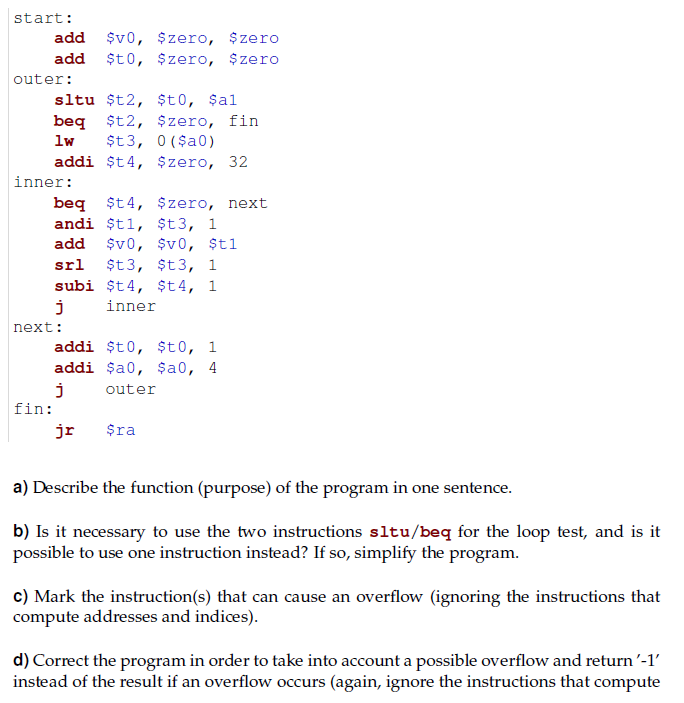
Hi everybody Unfortunately, I dont understand the following code. Can pls someone explain how to solve this? How do I do shift less than unsigned without knowing the value of a1? How can I translate this code in java to understand? Thanks,
-
Hi Can someone please explain how to solve the following code? How can I compare a0,a1 without a value? Thanks,